Payment reconciliation: how to match orders, fees, refunds and payouts to your bank account
A practical guide to payment reconciliation: match orders to payments, explain your balance with the ledger, tie payouts to bank deposits, and fix gaps.
On this page
- Why don't payouts match your sales?
- Step 1: reconcile orders against payments
- Step 2: reconcile your balance with balance transactions
- Step 3: reconcile payouts against bank deposits
- Export everything as CSV
- A daily payment reconciliation routine
- Common reconciliation mismatches and their causes
- Rehearse reconciliation in the sandbox
- Summary
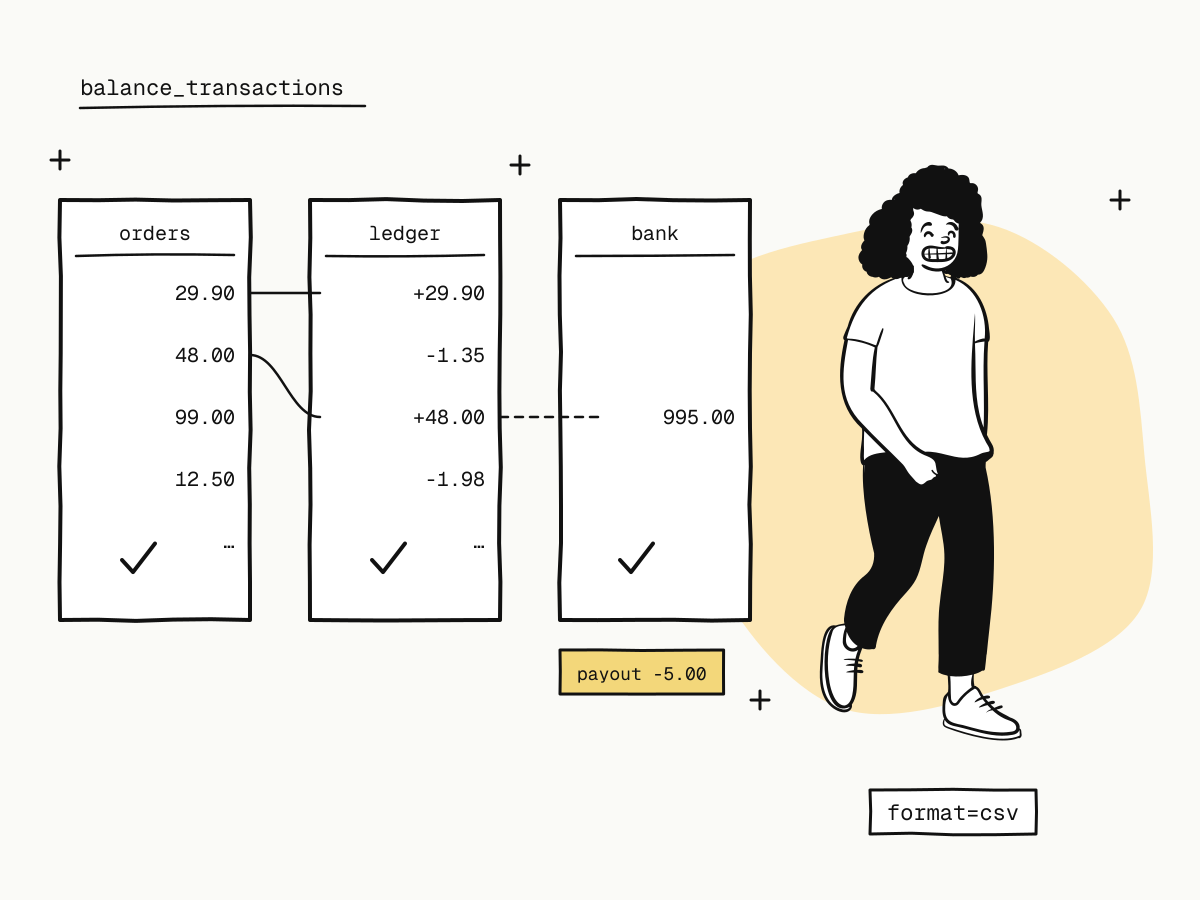
Payment reconciliation is checking that three records agree: the orders in your system, the payments your provider says it took, and the money that actually reached your bank. They never match line for line — fees come off, refunds and chargebacks move money back, payouts bundle many payments into one transfer — so reconciliation is about explaining every difference, not expecting none.
This guide breaks payment reconciliation into three steps you can run daily, shows which KukoPay data answers each one, and lists the mismatches you will meet most often and what causes them.
Why don't payouts match your sales?
Because between a sale and a bank deposit, money moves several times:
- Fees are taken when a payment is credited, so your balance grows by the net amount, not the order amount;
- Refunds and chargebacks take money back out, sometimes after a freeze;
- Payouts bundle many payments into one transfer and carry their own fee;
- Timing differs: a payment is credited at once but only becomes withdrawable once it has settled upstream — see what is payment settlement;
- Currencies are separate: USD, HKD and CNY are separate balances with separate payouts, and nothing is converted automatically.
Reconciliation works when you match each layer separately instead of comparing a month's sales with a bank statement.
Step 1: reconcile orders against payments
Question: did every order I think is paid actually get paid — and nothing else?
- Match on order numbers, never on
payment_id. An order can go through several payment attempts as a buyer switches methods, so itspayment_idcan change. Use yourout_trade_noand KukoPay'strade_no. - Paid means
status: "paid"(orpartially_refunded/refundedlater).pending,failedandexpiredorders took no money. - Pull the period's orders with
GET /v1/ordersfiltered by creation time, or export them as CSV (below). Compare with the orders your system marked paid frompayment.succeededwebhooks.
Anything paid on KukoPay but not in your system means a missed webhook: recover it from the events API — payment webhook not received walks through the causes.
Step 2: reconcile your balance with balance transactions
Question: can I explain every change in my balance?
Balance transactions record every movement as a signed row. Summing amount over a period gives exactly the change in your available balance, so the ledger explains the balance from the first row.
| Type | What it is | Sign |
|---|---|---|
payment_credit | A payment, at the full order amount | + |
fee_debit | The fee on that payment | − |
refund_freeze / refund_debit / refund_unfreeze | A refund accepted, confirmed, or refused and released | − / − / + |
dispute_freeze / dispute_debit / dispute_unfreeze / dispute_fee | A chargeback opened, lost, won or withdrawn, and its fee | − / − / + / − |
payout_freeze / payout_success / payout_fee / payout_unfreeze | A payout requested, completed, its fee, or rejected and released | − / − / − / + |
manual_adjustment | A correction by the platform (live only), with its reason in description | ± |
Three details save hours:
- A successful payment is two rows —
payment_creditplusfee_debit; their difference is the net amount. Match the pair to the order throughreference_id, which carries the order, refund, dispute or payout number. balance_before/balance_aftertrack the available balance. A freeze lowers available and raises frozen; a debit out of frozen leaves available unchanged, so before and after are equal on that row.- Fees are snapshotted. Each paid order carries
fee_details(fee group, percentage, fixed fee) as applied at the time, so a later rate change never alters a past payment. How cross-border payment fees are calculated explains the formula.
Step 3: reconcile payouts against bank deposits
Question: does every transfer into my bank match a payout?
A payout shows in the ledger as payout_freeze when requested, then payout_success (the net transferred) and payout_fee (the flat $5.00) when it completes — all with the payout number as reference_id. The amount that arrives is the payout minus $5.00, so a $1,000.00 payout arrives as $995.00.
- Match payouts, not payments, to the bank. One deposit is one payout, which may contain hundreds of payments.
processingis not paid. A live payout is approved first and transferred afterwards; it becomessuccess, with the bank reference recorded, only when the transfer has been made. Do not book it as received before then. The states are in payouts.
Export everything as CSV
Orders, refunds, disputes and balance transactions can be exported with format=csv:
curl -G "https://api.kukopay.com/v1/balance_transactions" \
  -H "X-Api-Key: $KUKOPAY_API_KEY" \
  -d format=csv \
  -d "created[gte]=2026-11-01T00:00:00Z" \
  -d "created[lte]=2026-11-30T23:59:59Z" \
-o 2026-11-ledger.csv- The file has a UTF-8 BOM, so Excel opens it correctly, and amounts are already converted to two decimals, ready to sum.
- An export returns at most 10,000 rows and is limited to 10 exports a minute on its own allowance — slice long periods into smaller
created[gte]/created[lte]windows. - A text field that starts with
=,+,-or@gets a leading apostrophe so a spreadsheet does not run it as a formula. That is deliberate, not corrupted data.
For automated jobs, the JSON lists are cursor-paginated (limit, starting_after), so rows arriving while you page are never skipped. See lists, pagination and export.
A daily payment reconciliation routine
Pull yesterday's paid orders and payment events
Compare with the orders your system fulfilled. Recover any missing events; investigate any order you fulfilled that is not paid.
Pull yesterday's balance transactions per currency
Check that the sum of amount equals the change in available balance, and that every row's reference_id matches an order, refund, dispute or payout you know about.
Match new bank deposits to completed payouts
Each deposit should equal a payout_success row; book the payout_fee as a cost.
Review what is still open
Pending refunds, open disputes and payouts in processing are not mistakes — they are money in transit. Note them and check again tomorrow.
Common reconciliation mismatches and their causes
| What you see | Usual cause |
|---|---|
| Paid on KukoPay, unpaid in your system | A webhook was not received — recover it from the events API |
| A buyer was charged after the order closed | Rare late payment: refunded in full automatically, with payment.duplicate_refunded; your balance is never touched |
| Balance lower than sales minus fees | Refunds, open chargebacks or payouts frozen |
| Available balance is negative | An open chargeback; payouts wait until later payments make it good — see the chargeback guide |
| Refund requested, balance not yet debited | The refund is pending; it is frozen until confirmed — see partial refunds explained |
| Payout approved, nothing in the bank | It is processing; the transfer has not been made yet |
| Totals do not add up across currencies | Each currency is its own balance; reconcile them separately |
Rehearse reconciliation in the sandbox
The sandbox ledger starts with an opening_balance row of 5,000.00 per currency, and Top up test funds adds a sandbox_top_up row — both are expected, not anomalies. A sandbox payout completes immediately with the same rows a live payout ends with. Run a few payments, a partial refund and a payout, export the ledger, and reconcile it before real money moves; test credit card numbers lists the scenarios.
Summary
- Payment reconciliation matches three layers: orders to payments, the balance to the ledger, payouts to bank deposits;
- match on
trade_no/out_trade_no, never onpayment_id, and recover missed payments from the events API; - balance transactions explain the balance row by row — a payment is
payment_creditplusfee_debit; - a bank deposit is one payout: the payout minus $5.00, booked when it is
success, notprocessing; - export with
format=csvin windows of up to 10,000 rows, and reconcile each currency on its own.
Try it in the sandbox
Create a merchant account and request a test key. The sandbox needs no business verification.