Webhooks vs polling: how to get payment results reliably
Webhooks vs polling for payment status: why webhooks should drive fulfilment, where a lookup belongs, and how to back both up so no payment is missed.
On this page
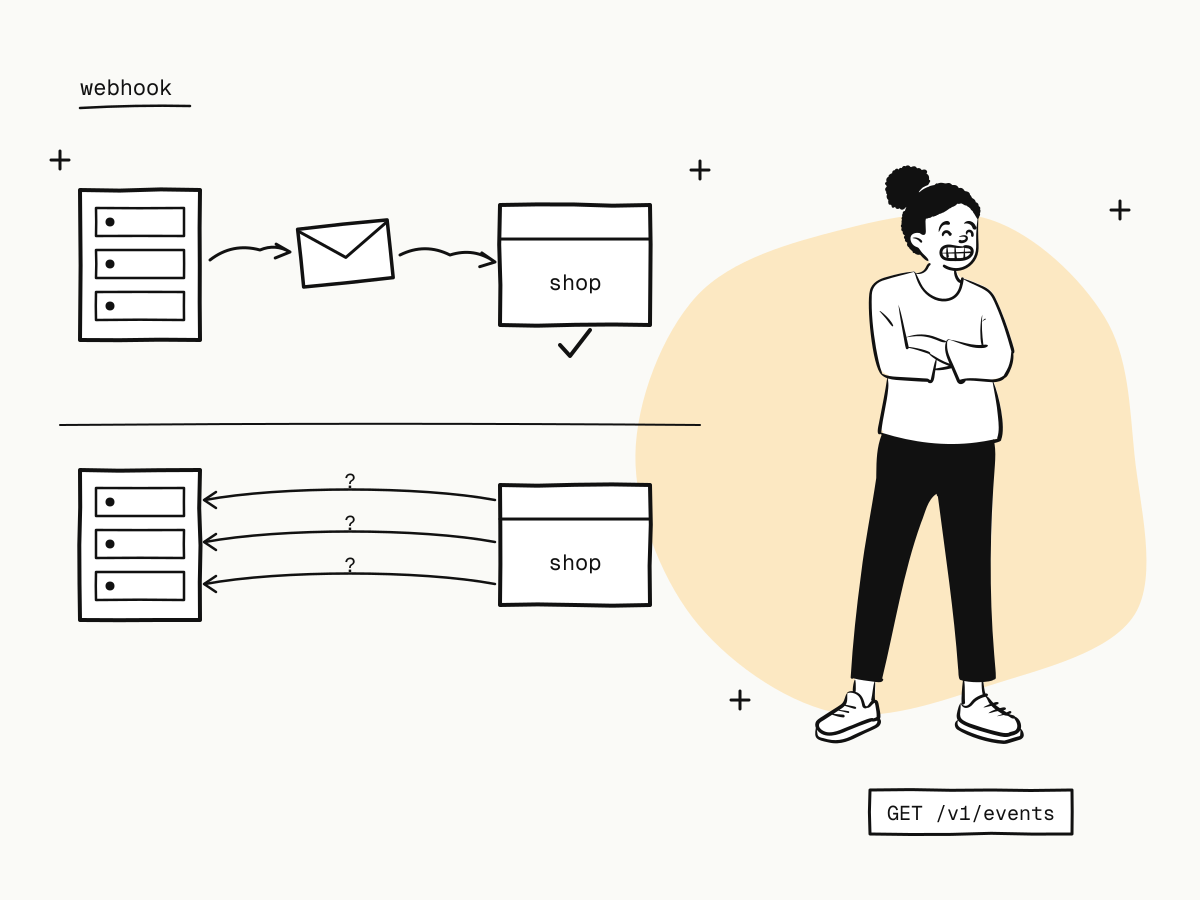
There are two ways to learn that a payment succeeded. Polling: your server asks the payment API again and again — "is it paid yet?". Webhooks: the payment platform tells your server the moment it happens. For payment status, the answer to webhooks vs polling is not one or the other: webhooks drive your workflow, a lookup answers specific questions, and a backfill catches anything missed.
This guide explains why polling alone is the wrong default for payments, where a direct lookup still belongs, and how to combine webhooks, lookups and the events API so no payment is ever missed.
Webhooks vs polling at a glance
| Webhooks | Polling | |
|---|---|---|
| How you learn | The platform calls you | You keep asking |
| Delay | Seconds after the event | Up to your polling interval |
| Cost | One request per event | One request per check — mostly "nothing new" |
| Rate limits | Not counted against your API quota | Every check counts |
| Works when the buyer closes the tab | Yes | Only if your poller keeps running |
| Needs a public HTTPS endpoint | Yes | No |
Why not just poll for payment status?
- It is slow or expensive. Poll every 5 seconds and you make 720 calls an hour per open order; poll every 5 minutes and buyers wait.
- It eats your rate limit. Reads are capped per merchant account, shared by every app and environment — a polling loop across many open orders can push your own traffic into
429— see API rate limits. - It misses the long tail. A buyer can approve a wallet payment or 3D Secure challenge long after they left your page; a poller that gives up after a few minutes never sees it.
- Some events are not things you would think to poll for — a refund the channel refused, a chargeback opened weeks later.
Why webhooks are the right default
On KukoPay every change is recorded as an event — payment.succeeded, payment.failed, payment.expired, refund.succeeded, dispute.created and the rest — and delivered to your endpoint as soon as it happens:
- deliveries are signed (HMAC-SHA256), so you can trust them after verification;
- a delivery that does not get a 2xx within 10 seconds is retried six times over about 2 hours 45 minutes;
- the webhook body is the same object a lookup returns, so one parser serves both.
Verify, deduplicate on the event id, answer 2xx quickly, then fulfil — duplicate payment webhooks shows the pattern.
Where a lookup still belongs
Webhooks drive the workflow; a single lookup answers a specific question at a specific moment:
- The buyer's return page. When the buyer lands on your
return_url, your backend looks the order up once (GET /v1/orders/{trade_no}) to show the right message. If it is stillpending, show "we're confirming your payment" and let the webhook finish the job — see return_url vs notify_url. - A support question. "I paid but my order says unpaid" — one lookup gives the truth.
- A pending refund, if you need the answer sooner than the webhook: check every 10 seconds for up to 5 minutes, then fall back to occasional checks.
- After a timeout on your own request, to see whether the order was created.
That is a handful of targeted calls, not a loop over every open order.
The safety net: recover what webhooks missed
Webhooks are delivered at least once, not guaranteed to arrive — your endpoint can be down for longer than the retries last. On KukoPay events are recorded first and delivered second, so nothing is lost:
- Backfill from the events API. Pull events by type and time range (
GET /v1/events) and feed them through the same handler; deduplication makes replays harmless — see payment webhook not received. - Reconcile daily. Compare your fulfilled orders with paid orders and the ledger once a day — see payment reconciliation.
The platform has its own safety net too: a reconciliation job keeps re-reading unresolved payments with the channel, so a payment is credited even if the buyer closed the tab and the channel's own notification was lost.
The recommended pattern
- Webhooks — subscribe to success, failure, expiry, refund and dispute events; fulfil on
payment.succeeded. - Targeted lookups — on the return page, for support and after timeouts.
- Events backfill — after any receiver outage, and as a scheduled catch-up.
- Daily reconciliation — the final check that every paid order was fulfilled.
When polling is the only option
If your system cannot expose a public HTTPS endpoint at all — an internal tool behind a firewall, say — poll the events API instead of individual orders: one call per minute for events since your last check covers every order at once, uses a single request, and stays far below the rate limit.
Summary
- Webhooks tell you the moment a payment changes; polling keeps asking and mostly hears "nothing new";
- polling alone is slow or expensive, eats your rate limit and misses late approvals;
- let webhooks drive fulfilment, and use single lookups for the return page, support, timeouts and pending refunds;
- back both up with the events API and daily reconciliation;
- if you cannot receive webhooks, poll the events list, not each order.
Try it in the sandbox
Create a merchant account and request a test key. The sandbox needs no business verification.