Cursor-based pagination explained: how to page through payment API lists without missing records
Cursor-based pagination explained: limit, starting_after, ending_before and has_more, why offset pagination skips records, and how to fetch every page.
On this page
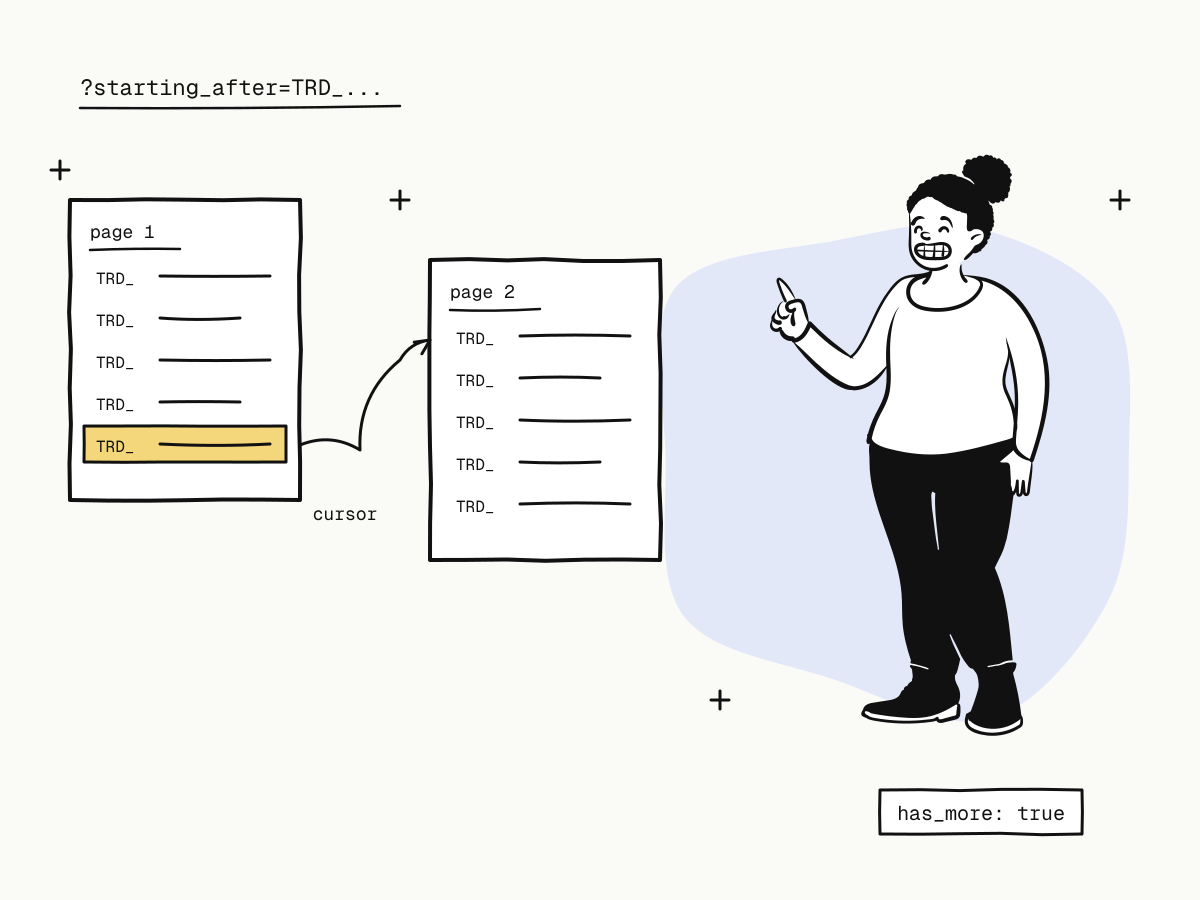
Cursor-based pagination pages through a list by pointing at a record rather than counting rows: "give me the next 100 after this one". Each page ends with an object whose id you send back as the cursor for the next request, and the API tells you when there are no more pages. Unlike offset pagination, it does not skip or repeat records when new ones arrive while you are reading — which matters a great deal when the list is payments.
This guide explains how cursor-based pagination works in the KukoPay API, why offset pagination loses records, how to fetch every page correctly, and how to use date filters and CSV export for large reads.
Cursor pagination vs offset pagination
| Offset pagination | Cursor-based pagination | |
|---|---|---|
| Request | ?page=3 or ?offset=200&limit=100 | ?starting_after=TRD_…&limit=100 |
| Anchored on | A position in the list | A specific record |
| New rows while reading | Shift everything — records are skipped or repeated | Do not affect pages already read |
| Jump to page 50 | Yes | No — you walk from a known record |
| Know the total | Usually | No — has_more says whether to continue |
Why offset pagination skips records
An offset says "start at row 100", and rows move while you read.
- A record joins the list. Lists are newest first. You read orders 1–100, a new order is created, and everything moves down one place: your next request,
offset=100, starts with the order you already read as the 100th. You process it twice. - A record leaves the list. You page through
status=pendingwhile buyers pay. Each order that becomespaiddrops out, everything after it moves up a place, and the record that slides into a position you have already passed is never read. Nothing tells you it happened.
For a reconciliation job that runs while a shop is taking payments, either one is a wrong total. That is why every KukoPay list is cursor-paginated and none accept page or offset.
How cursor-based pagination works in the KukoPay API
All lists share one set of parameters:
| Parameter | Meaning |
|---|---|
limit | Objects per page, 1–100, default 20 |
starting_after | The id of the last object on the previous page: returns the next page |
ending_before | The id of the first object on the current page: returns the page before it. Not allowed together with starting_after |
created[gte] / created[lte] | Only objects created in this window (ISO 8601 or Unix seconds) |
Every list is ordered by creation time, newest first, and returns only what the calling key can see, in the key's environment. The response wraps the page in a list object:
{
  "object": "list",
  "resource": "order",
  "has_more": true,
  "url": "/v1/orders",
  "data": [
    { "object": "order", "trade_no": "TRD_A1B2...", "status": "paid" },
    { "object": "order", "trade_no": "TRD_C3D4...", "status": "pending" }
  ]
}
The cursor is the list's own id field: trade_no for orders, refund_no for refunds, dispute_no for disputes, id for balance transactions and events, link_id for payment links, request_id for API logs.
How to fetch every page
Request the first page
With limit=100 and any filters — no cursor.
Process the page
Handle every object in data.
Stop or continue on has_more
If has_more is false, you are done. Otherwise take the id of the last object and send it as starting_after.
async function* allOrders(params = {}) {
  let startingAfter
  while (true) {
    const query = new URLSearchParams({ limit: "100", ...params })
    if (startingAfter) query.set("starting_after", startingAfter)

    const res = await fetch(`https://api.kukopay.com/v1/orders?${query}`, {
      headers: { "X-Api-Key": process.env.KUKOPAY_API_KEY },
    })
    const { data: page } = await res.json()

    for (const order of page.data) yield order
    if (!page.has_more) return
    startingAfter = page.data[page.data.length - 1].trade_no
  }
}

for await (const order of allOrders({
  status: "paid",
  "created[gte]": "2026-11-10T00:00:00Z",
  "created[lte]": "2026-11-10T23:59:59Z",
})) {
  console.log(order.trade_no, order.net_amount)
}
Cursor pagination mistakes to avoid
- Stopping when a page is short. Use
has_more. "Fewer thanlimitrows" works most of the time and costs an extra request at the boundary — and it is the wrong question to ask. - Building the cursor yourself. Send the id exactly as it came back; do not derive one from a timestamp.
- Paging the whole history every day. Narrow the read with
created[gte]andcreated[lte], so a daily job reads one day. - Retrying a whole run after an error. Keep the last cursor you processed and resume from it — the pages you already read have not changed.
- Ignoring rate limits. A large read is many requests;
429answers come withRetry-After. See API rate limits.
When to use CSV export instead
For a one-off or month-end read, format=csv on the orders, refunds, disputes and balance transactions lists returns a file instead of pages: up to 10,000 rows per request, with its own rate limit of 10 per minute, and with limit / starting_after ignored while filters still apply. Split a long period into smaller created windows. The daily routine built on it is in payment reconciliation.
Summary
- Cursor-based pagination anchors each page on a record, so new rows never make you skip or repeat one — offset pagination does;
- in the KukoPay API every list takes
limit,starting_afterandending_before, newest first, and answershas_more; - loop until
has_moreisfalse, sending the last object's id asstarting_after; - narrow reads with
created[gte]/created[lte], resume from the last cursor after an error, and use CSV export for large one-off reads.
Try it in the sandbox
Create a merchant account and request a test key. The sandbox needs no business verification.